Best SEO MCP Servers: The Free Stack I Actually Run
The SEO MCP servers worth running, including the free Search Console and Analytics pair that audits my site every morning before I have had coffee.

For most of this blog's life, my SEO process was vibes. Publish a post, feel good about it, maybe open Search Console two weeks later if I remembered the password. That's not a process. That's hoping.
Then I started treating Google Analytics and Search Console the way I treat my Raspberry Pi: something you monitor automatically, not something you check by hand when you remember to. I plugged in two more peripherals, an Analytics MCP and a Search Console MCP, and now a script runs every morning and hands Claude the keys to my own numbers before I've had coffee.
It found a real problem on day one. Below is the whole setup, plus exactly what it caught.
MCPs Are Peripherals. Now One of Them Watches My SEO
I wrote about this idea properly in MCPs: Peripherals for the AI, so I won't repeat the whole thing here. Short version: an MCP server gives Claude a new sense or a new hand. Chrome DevTools MCP let it see a live page and click around on it. These two give it eyes on my traffic and my search presence.
- The Analytics MCP pulls sessions, pageviews, and channel data straight out of Google Analytics
- The Search Console MCP pulls queries, page-level impressions and clicks, sitemap status, and indexing checks straight out of GSC
Neither one edits anything. They only read. Which turns out to be exactly what you want from something that runs unattended at 6 in the morning while you're asleep.
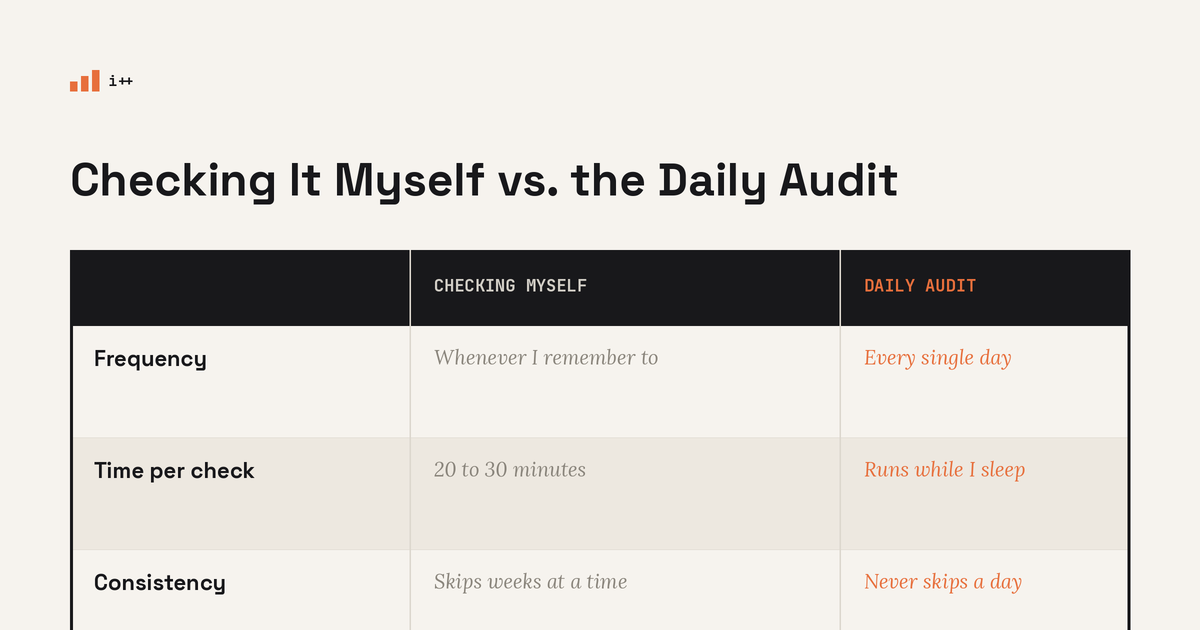
Here's what actually changed once I stopped doing this by hand:
Setting Up the Daily SEO Audit
The setup is three pieces: connect the peripherals, write the audit prompt, automate the trigger.
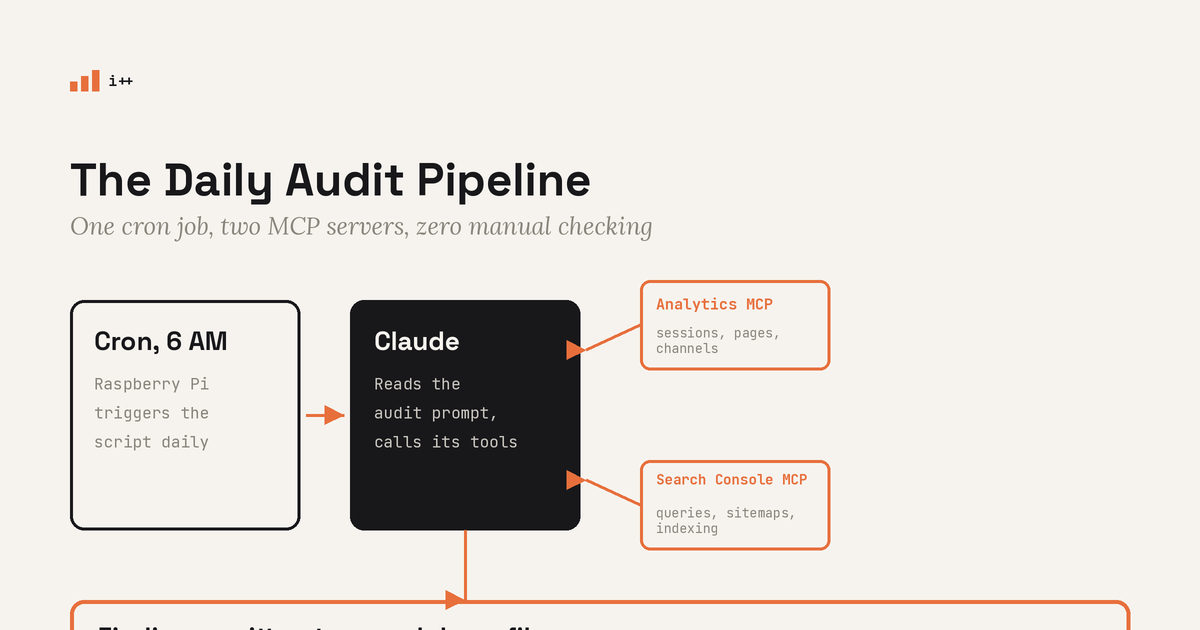
1. Connect the two MCP servers. Same as any other MCP, you add them through Claude's connector directory (or, if you're calling the API directly, as entries in the mcp_servers array on the request). Once connected, Claude can call their tools the same way it calls any other tool, it just has to load them first.
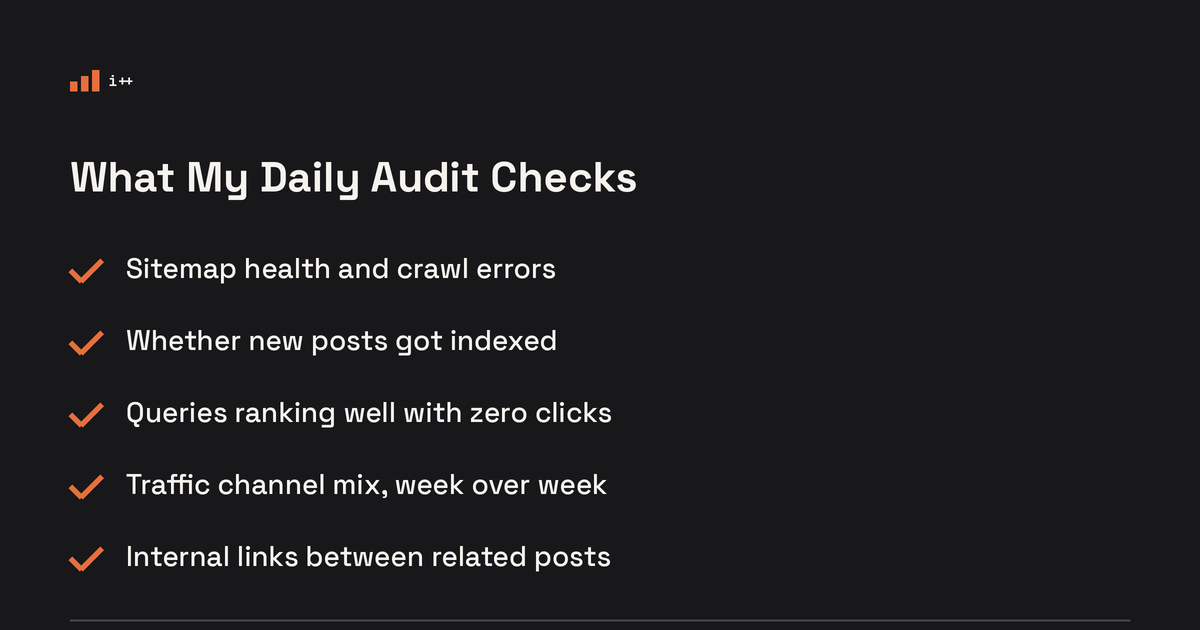
2. Write the audit prompt. This is the part that actually matters. A vague prompt gets you a vague summary. Mine asks for five specific things every time:
- Sitemap health and crawl errors
- Whether anything published in the last 7 days has actually been indexed
- Queries that rank reasonably well but pull zero clicks
- How the traffic channel mix is shifting week over week
- Gaps in internal linking between related posts
3. Automate it. A cron job on the Pi kicks off a small script each morning that calls the API with both MCP servers attached, and writes the findings to a markdown file:
# /etc/cron.d/seo-audit
0 6 * * * pi /home/pi/scripts/run_seo_audit.sh >> /home/pi/logs/seo-audit.log 2>&1
import anthropic
client = anthropic.Anthropic()
response = client.beta.messages.create(
model="claude-sonnet-4-6",
max_tokens=2000,
mcp_servers=[
{"type": "url", "url": ANALYTICS_MCP_URL, "name": "analytics-mcp"},
{"type": "url", "url": SEARCH_CONSOLE_MCP_URL, "name": "gsc-mcp"},
],
messages=[{"role": "user", "content": AUDIT_PROMPT}],
)
with open("/home/pi/seo-audit/latest.md", "w") as f:
f.write("\n".join(b.text for b in response.content if b.type == "text"))The exact connector URLs depend on which implementations you run. The two I actually run: Google's official google-analytics-mcp for analytics, and Amin Forou's mcp-gsc for Search Console. The first is read-only and talks straight to the GA4 Data and Admin APIs. The second is built specifically for SEO: query and page analytics, URL inspection, sitemap status, indexing checks. Both are open source, both authenticate with your own Google credentials, and neither can write a thing, which is exactly what you want from something running unattended at 6am. The shape of the script stays the same regardless of which you pick. I open latest.md with my coffee. No dashboard, no login, no remembering.
What Today's Audit Actually Found
I ran this exact setup while writing this post, so here's a real morning's findings instead of a hypothetical one.
Sitemap: clean. 39 URLs indexed, 0 errors, 0 warnings, last crawled today. Boring is good here, it means I can stop checking this box by hand.
The real find: ranking with nobody clicking. Over the last 28 days, every single query bringing up my site logged zero clicks, even ones sitting in genuinely good positions:
| Query | Position | Clicks (28d) |
|---|---|---|
| install cloudflared raspberry pi | 5 | 0 |
| local llm raspberry pi 5 | 9 | 0 |
| netdata raspberry pi | 10 | 0 |
| reusable prompts ai skills (page, 13 impressions) | 11.5 | 0 |
Zoomed out to the page level, /setting-up-monitoring-on-pi/ alone picked up 57 impressions over 28 days and converted exactly none of them into a visit. The one page that did earn an organic click, the local LLM tutorial, wasn't even ranking better, it sat at position 29.6 with 8 impressions and still pulled a click the others didn't.
Position wasn't the bottleneck on any of these. The title and meta description were.
The channel mix confirms it. Of my last 138 sessions, organic search accounted for 4. Direct traffic did the heavy lifting at 109, referral brought 15, social brought 10. Search isn't broken, it's just not converting the visibility it already has.
The Fixes It's Already Nudging Me Toward
None of these get pushed live automatically. The audit only reads, I still make the call. But the fix list writes itself once you see the data laid out:
- Rewrite the meta descriptions on the zero-click pages. Not to rank higher, they're already ranking fine, but to actually earn the click once someone sees the snippet. setting-up-monitoring-on-pi and reusable-prompts-ai-skills are first in the queue.
- Tighten internal linking across the AI and homelab cluster. This is part of why this post links back to the MCPs post and to running a local LLM on a Raspberry Pi 5. Internal links are the cheapest SEO lever there is, and the easiest one to forget once a post ships.
- Recheck indexing on anything published in the last week, since a post that Google hasn't crawled yet can't earn clicks no matter how good the title is.
Where the System Still Needs Me
It's read-only by design. Claude can tell me exactly what's wrong, it can't push a meta description edit or resubmit a URL on its own unless I deliberately wire up write access, and even then I want a human looking at anything before it goes live.
The connector drops silently, same as Ghost's. While writing this exact post, the Search Console MCP timed out on me twice in a row mid-session, a long silent wait with nothing back. That's the same failure pattern I've run into with the Ghost MCP I use for publishing, Fan Yang Meng's ghost-mcp, which I landed on only after trying oculairmedia's first and dropping it for covering fewer entities and hanging more often. Even the one I kept still stalls on large edits. The ecosystem is young; treat every one of these connectors as flaky by default. The fix is the same one too: treat a timeout as "the connector is down," not as "there's nothing to report," and retry before trusting a clean result. A cron job that quietly reports "all good" because a tool call failed is worse than no audit at all.
Quotas are real. Both the Analytics and Search Console APIs cap daily requests, so the audit runs once a morning instead of polling on a loop.
What's Next
The obvious next step is closing the loop: having Claude draft the actual meta description rewrite and open it as a Ghost draft for me to approve, instead of me copying suggestions out of a markdown file by hand.
If you've been following the monitoring setup on this Pi, this is the same philosophy applied to a different kind of dashboard. You can't fix what you can't see, and now I see this every morning without asking for it.